

Excel template and automatic payment statement
Payment statement for services and equipment rental
Download the free Excel template for the monthly payment statement to the principal. And stop building it by hand: with Synapse it comes out of the period’s signed daily reports, every line backed by its supporting documents.
What happens today
Missing reports
It’s month-end and you’re still missing signed reports to close the payment statement.
Disputed and pushed back a month
The principal disputes one line and the payment slips to the next cycle.
The monthly folder
Document by document, the principal’s folder is put together by hand every month.
What it must include
What a service payment statement must include
The payment statement is the breakdown of the work done in the period, which the principal reviews and approves before the invoice is issued. To avoid disputes, every line has to be backed up by its supporting documents.
- Contractor, principal, contract and period
- Payment statement number
- Each service with its unit, quantity and price
- The supporting documents for each line (signed daily reports, dispatch notes)
- Discounts or penalties for the period
- Net, VAT and total
- Certificates the contract requires, such as the F30-1
- The principal’s approval
Payment statement from the reports
What is signed in the field becomes the payment statement.
In Synapse every signed daily report adds its billable hours, standby and mobilization to the service order at the contract rate. When the period closes, the payment statement is already built, with the supporting documents for each line, and work done but not yet billed stays in plain sight.
- Service order
- Signed report
- Payment statement
- Approval
- Invoice
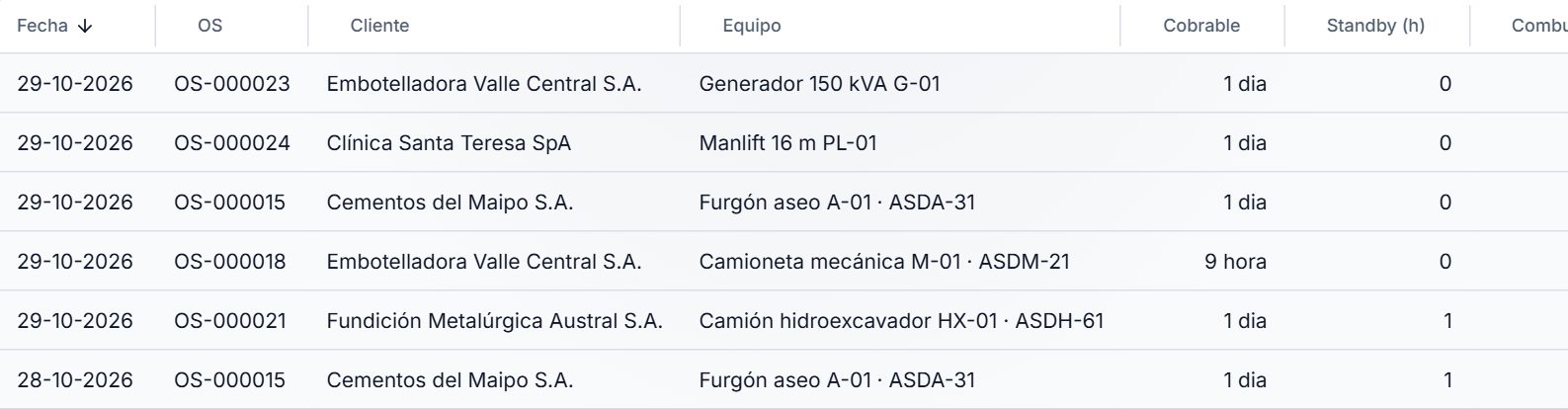
What is left to bill
To invoice, in plain sight.
Completed services that are not yet on a payment statement or an invoice are shown with their amount. Nothing gets forgotten in a report.

Free template
Payment statement template in Excel
Designed for services and equipment rental with operator, not for construction progress. With formulas for line total, net, VAT and total.
No sign-up. Works in Excel, Google Sheets and LibreOffice. The template is in Spanish.
- Header with contractor, principal, contract and period
- Ten lines with unit, quantity, price and supporting documents
- Subtotal, discounts, net, VAT and total calculated
- List of supporting documents for the principal’s folder
- Space for the principal’s approval
- Three sample lines to guide you
Frequently asked questions
Payment statement: what people ask us.
What is a payment statement?
It is the document with the breakdown of the work done in a period (services, hours, trips) that the contractor submits to the principal for approval. Once approved, the invoice is issued for that amount.
How is it different from an invoice?
The payment statement is the breakdown the principal reviews and approves; the invoice is the tax document issued afterwards, for the approved amount.
What supporting documents does the principal usually ask for?
It depends on the contract. The usual ones are signed daily reports, dispatch or transfer notes and, in many contracts, the certificate of compliance with labor and social security obligations (F30-1).
How is the amount calculated?
Quantity times the unit price of each service according to the contract rate (by the hour, shift, day, trip or ton), minus discounts or penalties for the period. VAT is added on top of the net amount.
Does the template work for construction?
It is designed for services and equipment rental, where you bill per unit delivered. In construction the payment statement is usually based on progress by line item, which is a different format.
Is the template free?
Yes. You can download it without signing up, and it works in Excel, Google Sheets and LibreOffice. It is in Spanish.
Keep reading
Let’s talk
Have the payment statement build itself at month-end.
We show you how it is built from your operation’s signed reports.
WhatsApp +56 9 9895 3042