

Excel template and digital version
Machinery daily report
Download the free Excel template, with hour meter, hours worked, standby and fuel. And when paper falls short, the digital version: it is signed on a phone and flows straight into the payment statement.
What happens today
Reports that come back late
The paper report reaches the office days later, or never, and invoicing waits.
Hours that don’t add up
The hours worked don’t match the hour meter, and nobody knows which figure is right.
Typing it in twice
Someone copies every report into a spreadsheet to build the payment statement. And makes mistakes.
What it must include
What a machinery daily report must include
A good report answers three questions: which unit worked, for how long and for which order. With that, you bill without arguments. These fields can’t be left out:
- Unit, license plate and operator
- Client, site and service order number
- Start and end hour meter readings
- Start time, end time and meal break
- Hours worked and standby hours, with the reason
- Mobilization and fuel added
- Work performed and incidents
- Signature of the operator and of the principal’s supervisor
Digital daily report
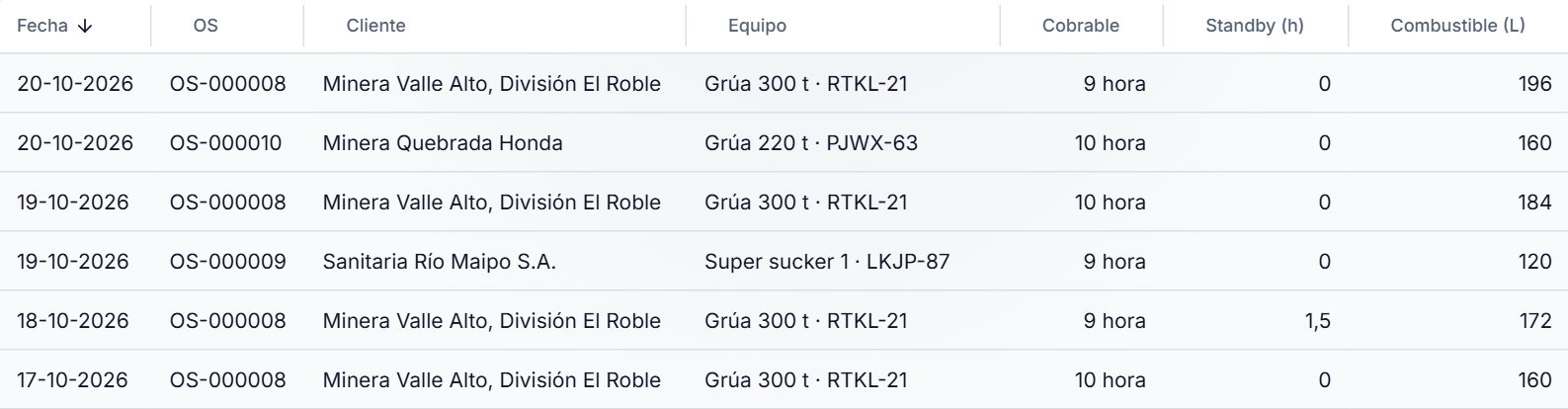
The signed report flows straight into the payment statement.
In Synapse the operator records the report on a phone, even without signal, or sends it by WhatsApp as a voice note. The principal’s supervisor signs it right there, and the billable hours, standby and fuel go into the payment statement and the invoice without being typed in again.
- Service order
- Signed report
- Payment statement
- Invoice
- Margin per unit
Free template
Machinery daily report template in Excel
One weekly sheet per unit, with the formulas ready: hour meter hours, hours worked minus the meal break, and weekly totals.
No sign-up. Works in Excel, Google Sheets and LibreOffice. The template is in Spanish.
- Header with company, principal, site and service order
- Seven days with hour meter, hours, standby and fuel
- Hours worked calculated automatically (end − start − meal break)
- Weekly totals of hours and liters
- Space for the operator’s and the supervisor’s signatures
- One sample row to guide you
Frequently asked questions
Machinery daily report: what people ask us.
What is a machinery daily report?
It is the record of what a unit did during a shift: who operated it, for which order, how many hours it worked, how long it was stopped and why, and how much fuel it took on. It is the supporting record used to bill the client and to calculate the unit’s cost.
What data must it include?
Unit and license plate, operator, client, site and service order, start and end hour meter readings, start time, end time and meal break, hours worked and standby hours with the reason, mobilization, fuel, work performed and incidents, and the signatures of the operator and of the principal’s supervisor.
How are hours worked calculated?
End time minus start time, minus the meal break. The hour meter serves as a cross-check: if the difference between the two is large, it is worth noting the reason (mobilization, unit running while waiting). The template does both calculations automatically.
Who signs the report?
The operator who fills it in and the supervisor of the client or principal receiving the service. That signature is what later supports the payment statement.
How do I get from the paper report to the invoice?
With paper, someone gathers the period’s reports, copies them into a spreadsheet and builds the payment statement. With Synapse the report is signed on a phone, and the hours, standby and fuel are ready in the payment statement and the invoice.
Is the template free?
Yes. You can download it without signing up, and it works in Excel, Google Sheets and LibreOffice. It is in Spanish.
Keep reading
Let’s talk
Leave paper behind. The report is signed on a phone.
We show you what a digital report from your operation looks like and how it flows straight into the payment statement.
WhatsApp +56 9 9895 3042